Swornim Pangeni
Is Your WordPress Site Hacked? How We Found and Removed Hidden Malware (Real Case Study)
TL;DR
A WordPress site was showing tens of thousands of unfamiliar pages in Google Search Console, an unrecognised admin account, and a wave of overseas login attempts. Investigation traced the cause to a disguised malicious file hidden in WordPress's mu-plugins folder, a fake administrator account, encoded payloads hidden inside the site's own database, and scheduled tasks built to reinstall the infection automatically. Nineteen separate malicious artefacts across five persistence layers had to be removed before the site was actually clean. Deleting the original file alone would have left four of those five layers fully intact.
A client came to us with a WordPress website that just wasn't behaving. Google Search Console was showing tens of thousands of pages nobody had created. The site occasionally looked broken, as if the styling had disappeared. Login attempts were pouring in from all over the world.
That combination of symptoms usually points to something bigger than a single bad plugin. So we went looking, and what we found was a fully established, multi-layered compromise built specifically to survive a surface-level cleanup.
Here's the full story of what happened, what we found, and what every business owner running a WordPress website should take from it.
The Warning Signs: Search Spam, a Mystery Admin, and a Broken-Looking Site
Tens of thousands of unfamiliar pages appearing in Google Search Console was the single clearest warning sign, and it's one of the most reliable indicators of a compromised WordPress site. Attackers frequently borrow the credibility of an existing, trusted domain to push spam pages, cloaked redirects, or content designed to rank for search terms that have nothing to do with the actual business.
That wasn't the only red flag. The WordPress user list included an administrator account nobody on the client's team remembered creating. The site's appearance was inconsistent, loading fine some of the time and losing its styling entirely at others. Wordfence, the security plugin already active on the site, was logging repeated login attempts from a long list of countries.
No single symptom here is proof of a hack on its own. Automated login attempts hit almost every public WordPress site every day, compromised or not. But when several of these signs show up together, especially unexplained search engine activity and an unrecognised admin account, it's a strong enough pattern to justify a proper investigation.
Buying Time First: Why We Blocked Traffic Before We Knew the Cause
A temporary country-level traffic block is a reasonable first move when the scope of a compromise isn't yet clear, because it reduces exposure while the real investigation happens. In this case, access was restricted to traffic from Australia only, as an emergency containment step rather than a fix.
It's worth being upfront about the trade-off. Blocking most of the world's traffic can also block search engine crawlers and legitimate customers travelling or based overseas, so it's never something you want to leave in place long term. It buys time. It doesn't solve anything, because the malware was already running locally on the server regardless of who could reach the front end.
Finding the Malware: A Disguised File in a Folder Most People Never Check
The core of the infection turned out to be a single disguised file sitting inside a WordPress folder called mu-plugins, short for "must-use plugins," which loads its contents automatically on every page without ever appearing in the normal Plugins screen in the dashboard.
That's precisely what makes this folder such an attractive hiding spot. A business owner, or even a developer doing a routine check of installed plugins, has no reason to look there, and nothing about the site would appear out of place from inside the WordPress admin area.
We found a file in that folder disguised as a legitimate cron management tool. It wasn't. Once examined closely, it turned out to be a heavily obfuscated backdoor, consistent with a known family of WordPress malware built for exactly this kind of long-term, low-visibility persistence.
An earlier attempt had already been made to delete this file through the hosting control panel's file manager, and it appeared to have worked. When checked directly through a secure server connection, however, the file was still present and still executing on every page load. A file showing as deleted inside a file manager doesn't always mean it's gone from the actual server.
What the Malware Was Actually Doing Once Installed
Once decoded, the file revealed a broad set of malicious capabilities built for one goal: staying installed no matter what got cleaned up around it. Malicious code like this is deliberately hard to read on purpose, with function and variable names scrambled into meaningless strings and much of the real logic encoded so it can't be understood just by opening the file in a text editor.
Once we worked through the obfuscation, the file was capable of:
- Creating new administrator accounts without anyone's knowledge, giving a way back into the site even after the original file was removed.
- Hiding itself from the WordPress plugin list, so a site owner checking installed plugins would see nothing unusual.
- Communicating with a remote server, meaning its behaviour could change over time without the file on the site itself ever needing to change.
- Rebuilding or restoring itself, a persistence mechanism specifically designed to survive partial cleanup attempts.
- Interfering with authentication, raising the possibility of session hijacking or impersonating a logged-in user.
This is usually the part that surprises non-technical business owners most. It isn't one bad file causing one bad symptom. It's a small program engineered with redundancy as its main design goal.
A Fake Admin Account and Hidden Data Inside the Database
Checking the WordPress user list turned up an administrator account with a randomly generated username, an email address built from the site's own domain, and a creation date lining up with when the compromise likely began.
This is a critical point for any business owner to understand. Even after every suspicious file on a website is deleted, an attacker holding a working admin login can simply log back in through the front door and reinstall everything. That account was removed, with any content it owned reassigned to the client's legitimate account rather than deleted outright.
The next discovery is the part a simple file scan would never catch. WordPress stores much of its configuration and content in a database table called wp_options. Buried among the legitimate entries were several with short, randomly generated names and unusually large values.
Decoding one of these values revealed a compressed, disguised copy of a full PHP plugin sitting quietly inside the database rather than anywhere on the file system. A separate decoded value contained a version number and, hidden inside it, the malware's own name spelled backwards, directly tying that database entry back to the malicious file already found.
The Numbers: What Was Actually Hiding on This Site
Nineteen distinct malicious artefacts were identified and removed across five separate categories, and mapping them out shows just how far this infection had spread beyond the one visible file. The chart below breaks down exactly what was found, by category.
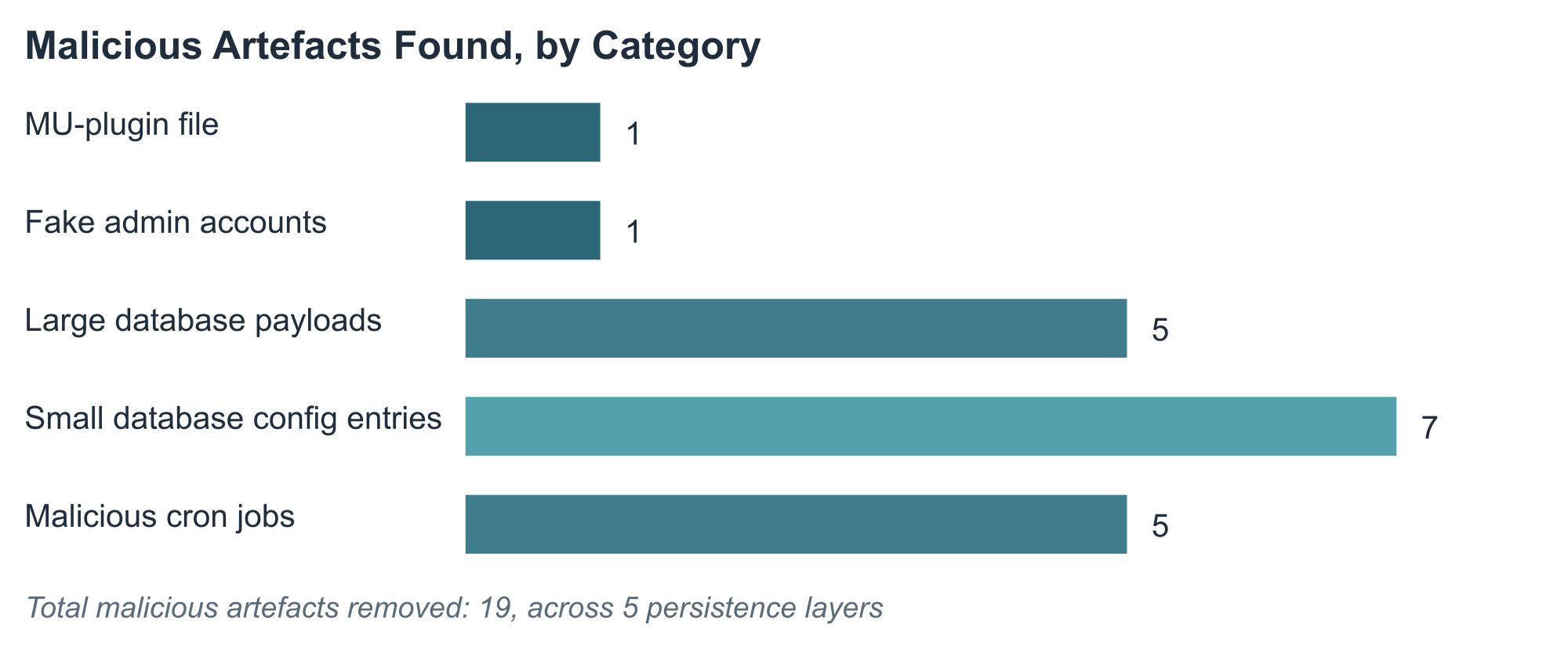
Twelve of the nineteen artefacts, the large and small database entries combined, were sitting inside the database rather than on the file system. That single fact is why a file-only cleanup, or a simple malware scanner that only checks files, would have missed the majority of this infection entirely.
What Happens If You Stop Halfway
Removing only the original file would have left four of the five persistence layers fully intact and capable of restoring the infection on their own. This is the part that matters most for any business deciding how thorough a cleanup needs to be after finding a compromised WordPress site.
Cleanup step completed | Persistence layers still active | Attacker could still get back in? |
|---|---|---|
Delete the malicious file only | 4 of 5 | Yes, via the fake admin account |
+ Remove the fake admin account | 3 of 5 | Yes, via hidden database payloads |
+ Remove large database payloads | 2 of 5 | Yes, via smaller config entries and cron jobs |
+ Remove malware configuration entries | 1 of 5 | Yes, via the scheduled cron jobs |
+ Remove the malicious cron jobs | 0 of 5 | No confirmed access path remaining |
Each row in that table represents a real decision point during this investigation, and it's a fair illustration of why so many WordPress cleanups fail. A quick fix that only addresses the most visible symptom often leaves three or four working paths back into the site.
Why This Took More Than Deleting One File
Five separate, independent persistence mechanisms had to be identified and confirmed before the site could genuinely be called clean, and each one worked as a fallback for the others. That's the defining feature of this kind of infection: it isn't reliant on any single component.
Layer | What it was | Why it mattered |
|---|---|---|
Malicious file | Disguised backdoor in the mu-plugins folder | Ran automatically on every page load, hidden from the plugin list |
Fake admin account | Randomly generated username with full admin rights | Gave a way back in even if every file was deleted |
Hidden database payloads | Encoded, compressed plugin code stored as database entries | Survived a file-only cleanup entirely |
Malware configuration data | Small encoded values storing version and identity markers | Supported the malware's other components |
Scheduled tasks | Randomly named recurring jobs in WordPress's scheduler | Could reinstall or reactivate the infection automatically |
This is really the core lesson of the whole case. A compromised website is a system, not a single broken part, and a piece of malware built with this much care will spread its survival mechanisms across as many independent places as it can. It's also the reason ongoing WordPress maintenance and monitoring matters more than a once-off cleanup, since new persistence tricks like this keep appearing.
Checking Everywhere Else, Just to Be Sure
Confidence in a cleanup comes from checking the places malware commonly hides even when nothing points there yet, and that's exactly what happened next in this investigation. The WordPress configuration file, the rules controlling how the site handles web traffic, the uploads folder, and published posts were all reviewed for signs of tampering.
Nothing further turned up in any of these areas. Combined with the earlier findings, that gave real confidence that the five identified persistence layers were the full extent of the compromise, at least based on everything the investigation could reach.
Why the Global Login Attempts Weren't Treated as the Root Cause
The repeated login attempts flagged by Wordfence were most likely ordinary automated scanning traffic rather than evidence of how the attacker actually got in, and that distinction mattered for how the investigation was framed. Public WordPress login pages are targeted by automated bots constantly, on compromised and perfectly healthy sites alike.
Seeing login attempts confirms that attempts happened. It doesn't confirm that any of them succeeded, and it doesn't rule out an entirely different entry point such as a vulnerable plugin or a leaked credential somewhere else in the chain. Treating login traffic as the automatic explanation is a common mistake, and one that can lead a cleanup down the wrong path while the actual entry point stays open.
What We Couldn't Fully Confirm
Every action the malware took once installed was confirmed through direct evidence, but exactly how it first got onto the site could not be proven with full certainty. Without complete historical server logs stretching back to before the compromise began, the original entry point remains a reasonable hypothesis rather than a confirmed fact.
The most likely explanations are an outdated plugin or theme with a known vulnerability, or compromised credentials somewhere in the chain, whether that's WordPress itself, the hosting account, or an FTP connection. Worth noting too: another website hosted on the same account showed a similarly patterned fake admin account, though no copies of the malicious file itself were found there, so a broader account-level issue remains a possibility rather than a confirmed conclusion.
What We Recommended After Cleanup
A clean website today doesn't stay secure tomorrow unless the underlying gaps that allowed the compromise are actually closed, which is why remediation didn't stop at removing the nineteen malicious artefacts. The following steps were put in place immediately afterwards:
- Rotate every credential connected to the site, including WordPress logins, hosting control panel access, FTP or SFTP, the database password, and any API keys.
- Replace WordPress's security keys, which immediately invalidates any previously stolen login sessions.
- Update everything, including WordPress core, all plugins, and all themes, and remove anything no longer in active use rather than just switching it off.
- Keep security monitoring active, with firewall protection, login monitoring, and file-change alerts running continuously rather than only after something's already gone wrong.
- Strengthen login protection, including strong unique passwords, multi-factor authentication where available, and rate limiting on login attempts.
- Replace the emergency geographic block with proper firewall and rate-limiting rules that don't risk locking out search engines or genuine customers overseas.
For businesses wanting to align this kind of hardening with a recognised framework, these steps map closely to the early maturity levels of the ACSC Essential Eight. It's a useful reference point even for smaller organisations without a dedicated IT team, and one worth reviewing annually rather than treating as a one-off exercise. If working through this list feels like a lot to take on alongside running a business, it's exactly the kind of ongoing care covered under a proper WordPress maintenance and care plan.
Getting Back Into Google's Good Books
Cleaning the website doesn't automatically clean up its search engine reputation, since tens of thousands of spam pages don't disappear from search results the moment the malware is removed. Search engines need to recrawl the site and update their own index, which takes real time rather than happening instantly.
Practical recovery steps include checking the Search Console security issues report for any manual actions or security notices, submitting an updated sitemap, requesting removal of clearly malicious URLs where possible, and monitoring indexing trends over the following weeks rather than expecting an overnight fix. Server logs are also worth reviewing periodically for continued requests to old spam paths, since that traffic can linger even after the pages themselves are gone.
Rebuilding search visibility after an incident like this is closely tied to the site's underlying SEO health, since a security incident and a stalled SEO recovery tend to compound each other if they're not managed together.
The Real Takeaway for Business Owners
A compromised WordPress site is rarely just one bad file, and this case is a clear illustration of why. Attackers who know what they're doing build in redundancy on purpose, spreading their access across files, user accounts, the database, and scheduled tasks, specifically so that a partial cleanup fails and the infection quietly returns.
That's why a proper investigation has to treat the whole website as a connected system rather than a checklist of one or two obvious symptoms. And it's why ongoing monitoring, timely updates, and strong credentials matter just as much after a cleanup as during it.
If your WordPress site is showing any of the warning signs mentioned here, unexpected pages in Search Console, accounts you don't recognise, or a site that just doesn't feel right, it's worth having someone take a proper look before assuming it's nothing.
Worried About Your Own WordPress Site?
If any of this sounds familiar, or you'd simply rather not find out the hard way, AlpineRoot Technologies builds and maintains secure, properly monitored WordPress websites for businesses across Perth and Australia. That includes clean builds from scratch, hardened migrations off compromised installs, and ongoing WordPress maintenance and care plans so issues like this get caught long before they turn into a tens-of-thousands-of-pages problem.
Get in touch with our team for a straightforward, no-obligation chat about securing or rebuilding your site.
Frequently Asked Questions
How do I know if my WordPress site has been hacked?
Common warning signs include unexpected pages appearing in Google Search Console, unfamiliar administrator accounts, a site that looks broken or inconsistent, and unusual login activity flagged by a security plugin. No single sign is definitive, but several appearing together is worth investigating.
Is it enough to just delete a suspicious file to fix a hacked WordPress site?
Usually not. Persistent WordPress malware often creates hidden admin accounts, stores encoded copies of itself in the database, and sets up scheduled tasks to reinstall itself. A thorough cleanup needs to check all of these areas, not just the file system.
What is a WordPress mu-plugin and why does it matter for security?
Mu stands for must-use. Files placed in this special folder load automatically on every page and don't appear in the regular Plugins screen in the WordPress dashboard, which makes it an attractive hiding spot for malicious code.
Why did login attempts from other countries not explain how the site was hacked?
Automated login attempts hit almost every public WordPress site daily, whether it's compromised or not. Seeing attempts in a security log confirms activity happened, not that any of it succeeded, so it can't be treated as proof of the original entry point on its own.
Should I restore from a backup instead of cleaning up a hacked site?
It depends. If a clean backup exists from before the compromise and no important changes have happened since, restoring can be faster. If significant legitimate work has happened since the last clean backup, a targeted investigation and cleanup is usually the better path.
Can hidden database payloads really survive a normal malware scan?
Yes. Many malware scanners only check files on the server, not the contents of the database. Encoded or compressed malicious code stored inside database tables can be completely invisible to a file-only scan, which is why a proper investigation checks both.
Don't let a compromised wordpress site destroy your business.
At Alpineroot, we specialize at developing secure websites and building a solid foundation for your business.